
Field notes / App review /
SSTV Lite on iOS
Three receives are enough to try a decoder. They are not enough to spend an evening chasing pictures. That distinction matters more than the word "Lite" on the icon.
Our verdict: Lite is a sensible way to try a complete receive-and-save workflow before paying. Its spectrum and waterfall give it more diagnostic depth than a picture-only decoder. The main reservation is the allowance: a recognised signal spends a receive even when the picture never finishes. For regular listening, judge the permanently unlocked app rather than expecting an indefinitely free receiver.
Editorial disclosure: SSTV.org.uk is published by the SSTV app team. This is our own assessment, not an independent review. We inspected retained iOS 2.0 release tests and captures, the receiver and entitlement code, and the current UK listing. We have not performed a new physical-iPhone or off-air test for this article.
Version check, 9 October: the UK App Store listing now shows 2.0.1, following 2.0 on 29 September, and requires iOS/iPadOS 16.6 or later. The 2.0.1 notes report receive/import stability, QSO attachment and ADX fixes, and purchase-loading recovery. The measured results below are from 2.0; we have not rerun them on 2.0.1.
A first receive that you can repeat
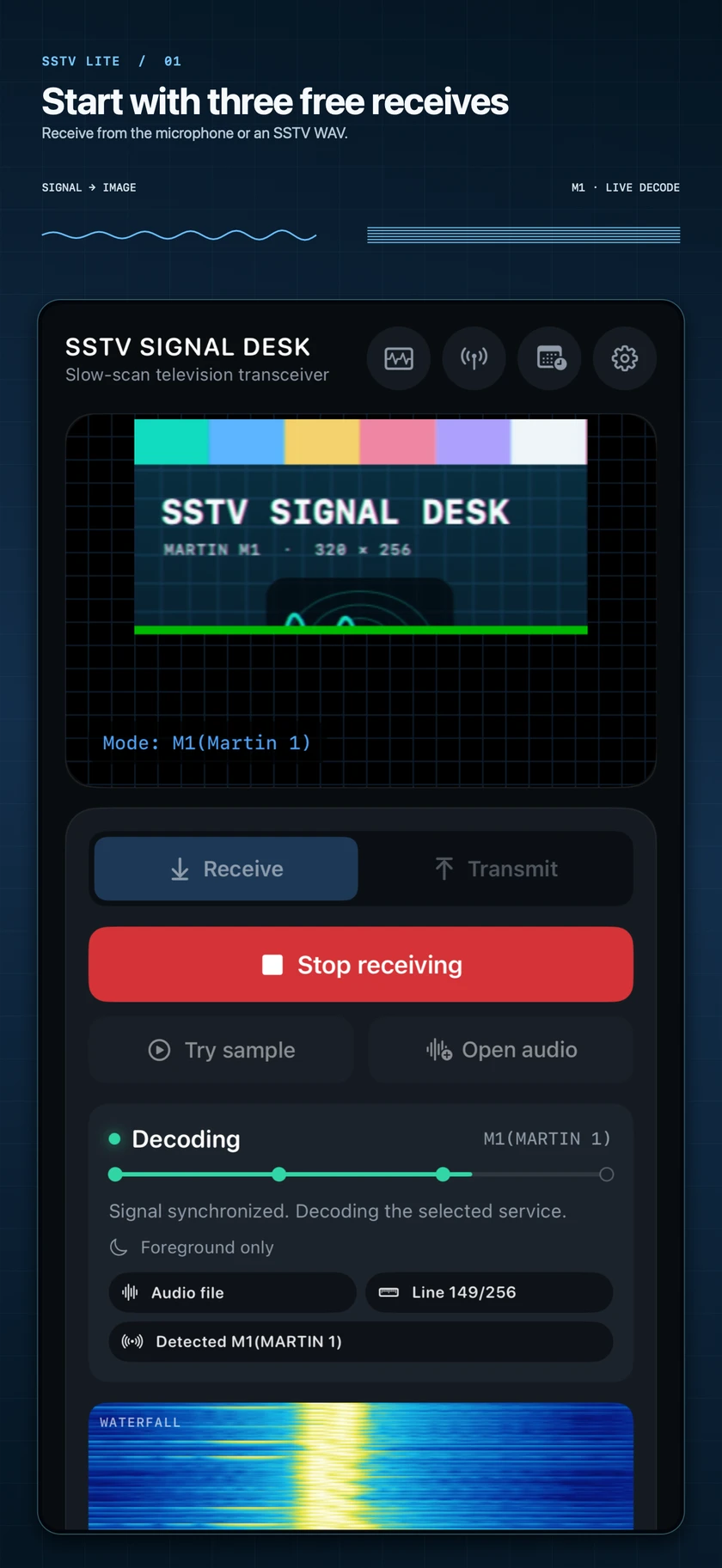
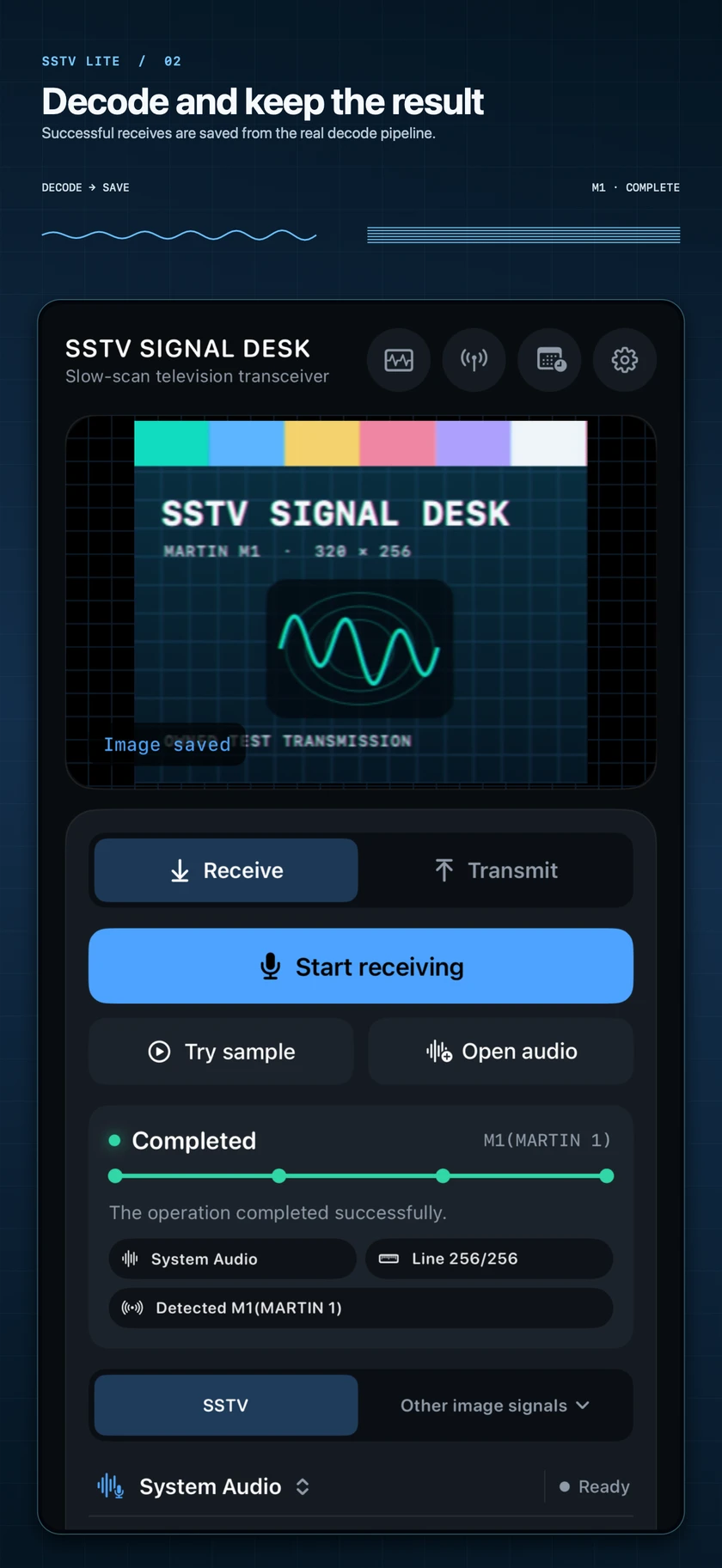
The useful starting point is a known recording, not an uncertain satellite pass. Lite offers Try sample for its bundled test and Open audio for a file of your own. Replay removes the aerial, squelch and speaker-to-microphone path from the first experiment. It does not remove the receive charge once a supported mode is identified.
For a short, documented example, our first-decode guide uses this Robot 36 WAV: 48 kHz, mono, 16-bit PCM, 38.315 seconds including the header, for a 320 by 240 picture. On iOS, use Open audio, then Open Audio File, and select the downloaded recording. Keep Auto mode for a complete sample with its identification header. The accompanying video is a native Mac Pro replay, not an iOS Lite performance measurement.
What makes the workflow useful is the separation of stages. The source status tells you whether samples are arriving; the detected mode tells you what the receiver has recognised; the advancing image tells you whether line decoding is continuing. A completed receive belongs in the receive archive, not just on a transient preview. Open Receive log, select the picture, then use Share to export it.
For microphone reception, the phone still needs usable audio from a radio or another playback device. Replay is the more controlled comparison: a distorted speaker signal and a clean imported WAV are not equivalent decoder tests. Keep the original recording alongside the exported picture if you want to investigate a failure later.
The mode menu is not a promise about every historical format
M1, Scottie, Robot and PD are familiar places to start, but select the transmitted mode rather than the most attractive image size. For comparison, Martin M1 carries 320 by 256 RGB in about 114 seconds of image scanning; Robot 36 carries 320 by 240 with shared chroma in about 36 seconds. File length also includes headers and any lead-in or tail. Those are format timings, not measurements of iPhone processing speed.
Our mode table includes historical reference entries as well as app-supported modes. It is not an app compatibility checklist. Likewise, SSDV, Weather Fax and ETSI DRM A-E have separate framing, timing and input requirements; a DRM Mode E I/Q recording is not a substitute for an analog SSTV audio file.
The instruments earn their space
A picture alone cannot tell you whether silence came from the radio, the audio route or the decoder. Lite's mobile instrument workspace separates Source and Decode observation points. The Spectrum view pairs a frequency plot with a scrolling waterfall, so you can compare the incoming samples with the signal reaching the decoding stage.
The shared instrument implementation provides FFT sizes from 256 to 16,384, Hann or rectangular windows, averaging and peak hold. The waterfall has automatic or manual display range, thermal or monochrome palettes, and 5-, 8- or 10-second history. These are actual receiver controls, not a decorative animation behind the image.
The trade-off is resolution versus responsiveness. A larger FFT separates nearby tones more finely, but describes a longer slice of samples; heavy averaging smooths the trace while making brief changes less obvious. Start with the default 1,024-point Hann display before changing several controls at once. For analog SSTV, a narrow view around the audio tones is usually more useful than a large empty span.
Read the scale correctly. Ordinary microphone and replay displays are in dBFS, relative to digital full scale, not received RF power at an aerial. The implementation only uses a calibrated dBm scale when a matching calibration profile is available; choosing dBm does not calibrate a phone microphone. A bright waterfall is not proof of a good signal-to-noise ratio, and it cannot restore samples already clipped in the recording.
The iPhone capture shows why this is a compact receiver rather than a desktop panel shrunk to fit: the image, progress and source state take priority, with deeper instruments in their own workspace. An iPad offers more room for simultaneous observation. That is a layout advantage, not evidence that its decoder recovers weaker signals.
Free versus unlocked: the important boundary
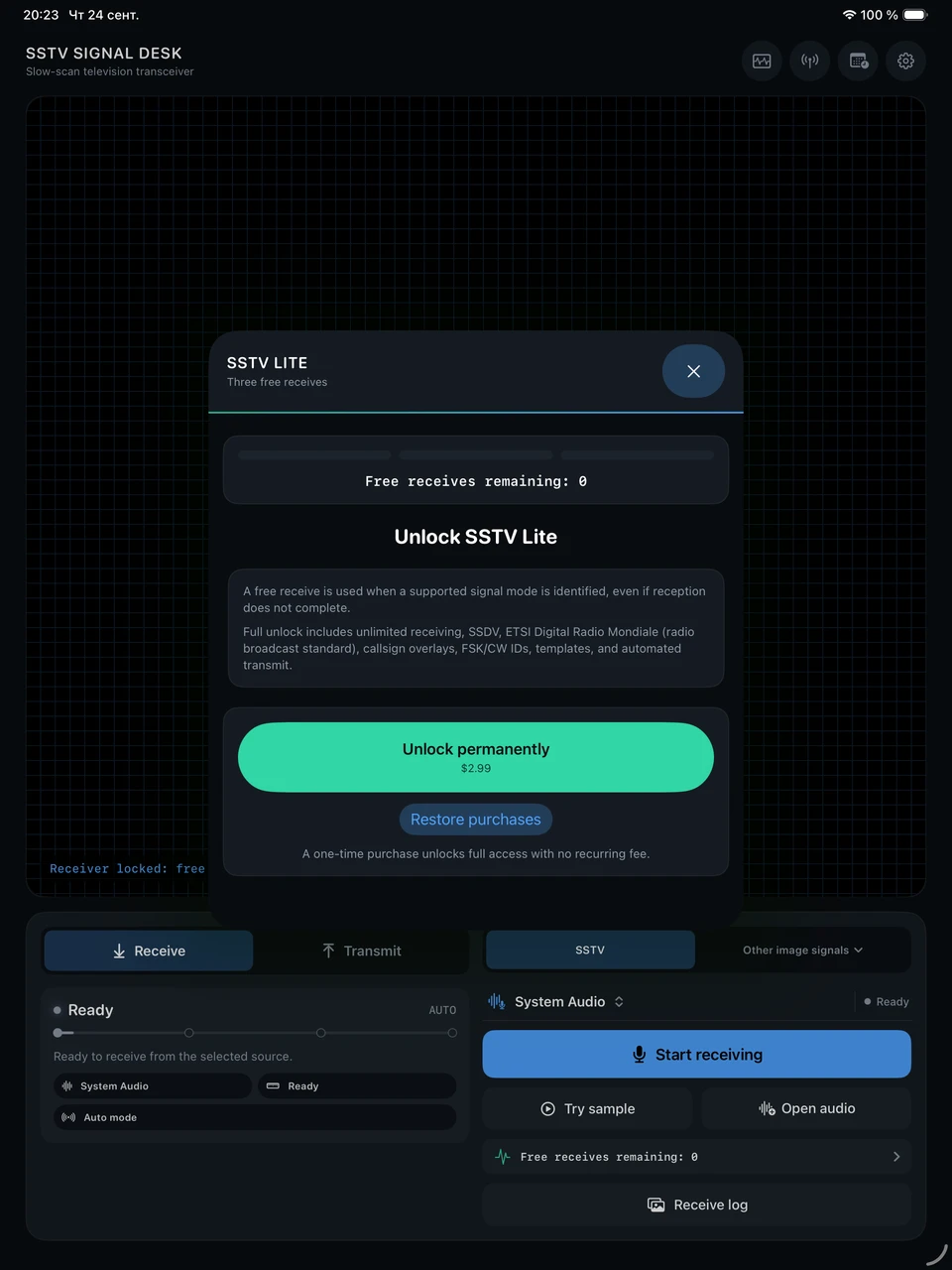
In the 2.0 generation, Lite has three free SSTV or Weather Fax receives. The count advances when a supported signal mode is identified, not when an image is successfully saved. Stopping after identification, losing the signal or obtaining only a partial picture does not turn that attempt back into an unused receive. The counter is persistent, not a daily allowance.
| Task | Lite before purchase | Permanent Full Unlock |
|---|---|---|
| Supported analog SSTV and Weather Fax reception | Three receives, charged at mode identification | Unlimited receiving |
| Replay and save a completed analog receive | Available within the allowance; importing is not a free bypass | Available without the receive limit |
| SSDV and ETSI DRM reception | Locked; selecting the premium path opens the unlock offer | Included, subject to supported profiles and input formats |
| Basic analog transmit preparation and station callsign | Available; these do not spend a receive | Available |
| Callsign overlays, FSK/CW IDs, templates and automated transmit | Premium tools are locked | Included |
The UK listing checked on 9 October names the one-time purchase Permanent Decode Unlock at £2.99. The app calls it Permanent Full Unlock; the broader name reflects the digital and transmit tools it also enables. It is not a subscription. Treat the price presented by StoreKit in your own storefront as the checkout price.
The short allowance is reasonable for a clean-file trial and less generous for experimenting with noisy radio audio. Use the first receive for a known sample, then inspect and export that saved image without starting another decode. Keep the remaining attempts for a radio recording or a different format rather than replaying the same file until the counter runs out. Watching the website's demonstration or downloading a WAV does not use an app receive; decoding it in Lite can.
Older references to five free decodes concern Lite 1.x, which counted successfully saved images. They do not describe the current three-receive rule. Our support notes keep the version distinction explicit.
What the retained iOS checks establish
The release records below were inspected for this article. Both runs used SSTVLite on an iPad Pro 13-inch (M4), iOS 26.1 Simulator on 24 September 2026. They are not fresh tests of the retail 2.0.1 build, and the simulator's purchase environment is not Apple's live billing service.
| Check | Recorded result | What it does not establish |
|---|---|---|
| Allowance and purchase UI | 17 passed, 0 failed, 0 skipped. Covers the remaining counter, exhausted allowance, premium receive gates, simulated purchase/restore and recoverable payment states. | Three real radio receives or a real-money transaction; counters were seeded for each scenario. |
| Bundled receive after unlock | 1 passed, 0 failed, 0 skipped. A simulated purchase was followed by a bundled Martin M1 decode: Completed, mode M1, with a saved image record. | A free Robot 36 receive on a physical iPhone, visual fidelity across all modes, or weak-signal performance. |
The purchase tests exercise cancellation, pending approval, unverified transactions, failures, unavailable products and restoring without a purchase. Successful simulated purchase and restore remove the allowance; unsuccessful paths must not grant full access. The landscape paywall and a largest-text audit were also exercised. This is useful evidence of entitlement handling, not a full VoiceOver or whole-app accessibility certification.
The M1 result matters because it reaches a saved artifact after the unlock, rather than merely proving that a purchase button changes colour. It still says nothing about which decoder wins on a noisy HF channel. We have not measured battery drain, sustained device temperature, Bluetooth routing, background reception or calibrated sensitivity for this review.
Frequency/slant correction and partial-image saving are useful provisions in the receive implementation. There is no signal-quality sweep in these records, so we will not assign them a recovery percentage or claim they rescue every damaged transmission. The M1 sample and round-trip material provide a separate codec reference, not a substitute for an iOS field test.
On-device decoding does not mean no network use
The receive and encode pipelines run on the device. That is useful for local replay: audio does not need to go to a remote decoder to become a picture. It is a narrower statement than saying the whole app is offline or collects no data.
When signed in to iCloud, selected station records use a private CloudKit database: station profile, preferences, QSO log, satellite favourites and reminder rules. Decoded-image sync is optional. Raw WAV/IQ recordings, receiver endpoints, calibration and purchase state are outside that sync boundary. Remote SDR connections and orbit/transmitter updates have their own network requirements; private cross-device sync was not retested here.
The App Store privacy label lists potentially identity-linked location, contact information, user content, identifiers and usage data. It is developer-declared, not independently verified by Apple. Read the privacy policy for feature-specific storage and permission details instead of treating "on device" as a blanket privacy guarantee.
Who should try it, and who should skip the trial
For a first SSTV experiment, Lite's strongest argument is the complete path from imported audio to a saved picture, with enough signal visibility to investigate an empty or stalled decode. Begin with a known file, check the receive count before starting, and keep the recording. You can learn more from that single controlled receive than from several uncertain speaker captures.
For regular HF or satellite listening, the three-use limit is the wrong basis for judging long-term value. Permanent unlock makes more sense when repeated replay, digital formats or advanced transmit preparation are part of the station. Operators who already know they want the full edition can go directly to SSTV Signal Desk (Pro); compare the editions and purchase route in our app-selection note.
Lite is not a calibrated RF instrument, and our retained M1 check is not a competitive weak-signal benchmark. Within those limits, it is a well-equipped trial receiver with a clearly bounded free allowance. The next useful evidence is a saved picture and its original waveform, not another feature list.
SSTV Lite on the UK App Store · Try the documented first decode · Share a reception report